

MLflow is an open-source platform designed to manage the entire machine learning lifecycle, making it easier for ML Engineers, Data Scientists, Software Developers, and everyone involved in the process. Since the release of MLflow 3 in 2025, it also covers generative AI, with tools to trace, evaluate, and monitor LLM-based AI applications and agents.
MLflow can be seen as a tool that fits within the MLOps (DevOps practices applied to machine learning) framework. Machine learning operations (MLOps) are a set of practices that automate and simplify machine learning (ML) workflows and deployments.

This intro to MLflow explains what it does, how its components fit together, and how to use MLflow in your own projects. Many machine learning projects fail to deliver practical results due to difficulties in automation and deployment. The reason is that most of the traditional data science practices involve manual workflows, leading to issues during deployment.
MLOps aims to automate and operationalize ML models, enabling smoother transitions to production and deployment. MLflow started by addressing the challenges in the development and experimentation phase, and it now spans the full model lifecycle from experiment tracking to deployment and monitoring.
Stages of the ML Lifecycle
- Data Acquisition: Collect data from relevant sources to accurately represent the problem you’re solving.
- Data Exploration and Preparation: Clean and prepare the data for analysis, including identifying patterns and fixing inconsistencies, otherwise known as data annotation. Data rarely comes in a clean, ready-to-use format.
- Model Training: This step involves selecting an algorithm, feeding it with training data, and iteratively adjusting its parameters to minimize error.
- Model Evaluation: Assess the performance of trained models to identify the most effective one.
- Deployment: Once a model is selected based on its evaluation metrics, it is deployed into a production environment. Deployment can take various forms, such as integrating the model into existing applications, using it in a batch process for large datasets, or making it available as a service via an API.
- Monitoring: After deployment, teams track model performance on live data and retrain when accuracy drops or the data changes.

Automating these ML lifecycle steps is extremely difficult. Many models never reach production, and those that do are hard to maintain. Here are the challenges engineers face during the development stage of ML models:
- A Variety of Tools: Unlike traditional software development, ML requires experimenting with various tools (libraries, frameworks) across different stages, making workflow management complex.
- Experiment Tracking: Numerous configuration options (data, hyperparameters, pre-processing) impact ML outcomes. Tracking these is crucial but challenging for the result analysis.
- Reproducibility: The ability to reproduce results is crucial in ML development. However, without detailed tracking and management of code, data, and environment configurations, reproducing the same results is impossible. This issue becomes even more difficult when code is passed between different roles, such as from a data scientist to an AI software engineer for deployment.
- Production Deployment: Deploying models into production involves challenges related to integration with existing systems, scalability, and ensuring low-latency predictions. Moreover, maintaining CI/CD (continuous integration and continuous delivery) is even more challenging.
Bring a new AI vision application to life.
What Is MLflow?
MLflow is an open-source platform that helps streamline the ML process by following the MLOps framework. Created by Databricks in 2018, it is now one of the most widely used tools to train models, compare them, and manage how a team deploys models. Its classic machine learning features can be divided into four major components:
- MLflow Tracking: An API for recording experiment details. This includes the code used, parameters set, input data provided, metrics generated during training, and any output files produced.
- MLflow Projects: MLflow Projects provides a simple format for packaging machine learning code into reusable projects. Each project can specify its environment (e.g., required libraries), the code to execute, and parameters that enable programmatic control in multi-step workflows or automated hyperparameter-tuning tools.
- MLflow Models: MLflow Models provide a standardized format for packaging trained models. This format includes both the code and data essential for the model’s operation.
- Model Registry: This is a centralized place to view all your ML models, offering features such as collaboration and model versioning.
Recent releases add a set of generative AI features on top of these components, including tracing, LLM evaluation, a prompt registry, and an AI gateway. In short, MLflow enables a single workflow for experiment tracking, model evaluation, packaging, and deployment, whether you are working with classic machine learning models, computer vision networks, or LLM-based agents.
What Is MLflow Tracking?
MLflow Tracking is an API that helps you manage and monitor your machine-learning experiments. The API helps to log, track, and store information regarding experiments. You can use the API using Python, REST, R, and Java. Here are the terms/features of MLflow Tracking:
- Runs: In MLflow, a “Run” is an individual execution of machine learning code. Each run represents a single experiment, which could involve training a model, testing a set of hyperparameters, or any other ML task. They serve as containers to provide a structured way to record the experimentation process.
- Experiments: Related runs are grouped into experiments. This helps organize your experiments and compare runs within the same context.
- Tracking APIs: These APIs allow you to programmatically interact with MLflow Tracking to log data and manage experiments.
- Tracking UI: A web interface for visualizing experiment results and exploring runs.
- Backend Store: MLflow supports two types of storage for the backend: local files or database-based, like PostgreSQL.
- Artifact Store: Stores larger files generated during your runs, such as model weights or images. You can also use Amazon S3 and Azure Blob Storage.
- MLflow Tracking Server (Optional): An optional component that provides a central service for managing backend stores, artifact stores, and access control.
MLflow Tracking offers flexibility to adapt to your development workflow. You can use it to track models locally or in the cloud.
- Local Development: For solo development, MLflow stores everything locally by default, without needing any external servers or databases.
- Local Tracking with Database: You can use a local database to manage experiment metadata for a cleaner setup compared to local files.
- Remote Tracking with Tracking Server: For team development, a central tracking server provides a shared location to store artifacts and experiment data with access control features.

Benefits of Tracking Experiments
Experiment tracking of your ML model with MLflow brings several key benefits:
- Comparison: MLflow Tracking allows you to effortlessly compare different Runs and analyze how changes in parameters or training configurations impact model performance. This facilitates identifying the best-performing models for deployment.
- Reproducibility: Experiment tracking captures all the intricacies of a Run, including code versions, parameters, and metrics. This ensures you can reproduce successful experiments later.
- Collaboration: You can share your experiment results with team members and ask for help when stuck.
How to Use MLflow: A Quick Example
The fastest way to see what MLflow tracks is to log a simple training run. After installing it with pip install mlflow, the script below trains a scikit-learn classifier while logging parameters, metrics, and the model itself:
import mlflow from sklearn.datasets import load_iris from sklearn.ensemble import RandomForestClassifier from sklearn.model_selection import train_test_split X, y = load_iris(return_X_y=True) X_train, X_test, y_train, y_test = train_test_split(X, y, random_state=42) mlflow.set_experiment("iris-demo") with mlflow.start_run(): params = {"n_estimators": 100, "max_depth": 3} model = RandomForestClassifier(**params).fit(X_train, y_train) mlflow.log_params(params) mlflow.log_metric("accuracy", model.score(X_test, y_test)) mlflow.sklearn.log_model(model, name="model")
Run mlflow ui in your terminal and open the local address it prints to compare runs in the browser. For popular libraries, a single call to mlflow.autolog() handles logging parameters, metrics, and artifacts automatically, so you don’t need to add each log statement yourself.
What Are Projects?
Projects offer a standardized way to package the ML code into projects for reusability and reproducibility. Each MLflow Project is a directory containing code or a Git repository. It’s defined by a YAML file called MLproject, which specifies dependencies (using a Conda environment or a Docker container image) and how to run the code.
Projects provide flexibility in execution using project entry points, which are commands with named parameters, allowing users to run specific parts of the project without needing to understand its internals. These parameters can be adjusted when the project is run. The core of an MLflow Project is its MLproject file, a YAML file that specifies:
- Name: Optionally, the name of the project.
- Environment: This defines the software dependencies needed to execute the project. MLflow supports virtualenv, Conda, Docker containers, and the system environment.
- Entry Points: These are commands within the project that you can invoke to run specific parts of your code. The default entry point is named “main”.
Projects can be submitted to cloud platforms like Databricks for remote execution. Users can provide parameters at runtime without needing to understand project internals. MLflow automatically sets up the project’s runtime environment and executes it.
Moreover, projects can be tracked using the Tracking API. Using projects in your ML pipeline provides the following benefits:
- Reusable Code: Share and collaborate on packaged code.
- Reproducible Experiments: Ensure consistent results by capturing dependencies and parameters.
- Streamlined Workflows: Integrate projects into automated workflows.
- Remote Execution: Run projects on platforms with dedicated resources.
MLflow Models
MLflow models allow the packaging of the entire trained ML or AI model into multiple formats (e.g., TensorFlow or PyTorch), which the developers have named “flavors”. The important feature of this is that the same ML model can be deployed in a Docker container for real-time REST serving, and at the same time, can be deployed as an Apache Spark user-defined function for batch inference.
This multi-flavor system ensures that a model can be understood and used at various levels of abstraction. Additionally, you don’t need to tweak and manage lots of tools. Here are a few flavors:
- Python Function: This versatile flavor allows packaging models as generic Python functions. Tools that can execute Python code can leverage this flavor for inference.
- R Function
- Spark MLlib
- TensorFlow and PyTorch
- Keras
- H2O
- scikit-learn
- ONNX
- Hugging Face Transformers, LangChain, and OpenAI for LLM and generative AI models
MLflow Model Structure: The MLmodel file is a YAML file that lists the supported flavors and includes fields such as time_created and run_id. In MLflow 3, logged models also became first-class objects (LoggedModel), so you can compare model versions, checkpoints, and agent variants directly, rather than only through the runs that produced them.
Benefits of Flavors in Models
- Models can be used at different levels of abstraction depending on the tool.
- Enables deployment in various environments like REST API model serving, Spark UDFs, and cloud-managed serving platforms like Amazon SageMaker and Azure ML.
- Significantly reduces the complexity associated with model deployment and reuse across various platforms.
Model Registry
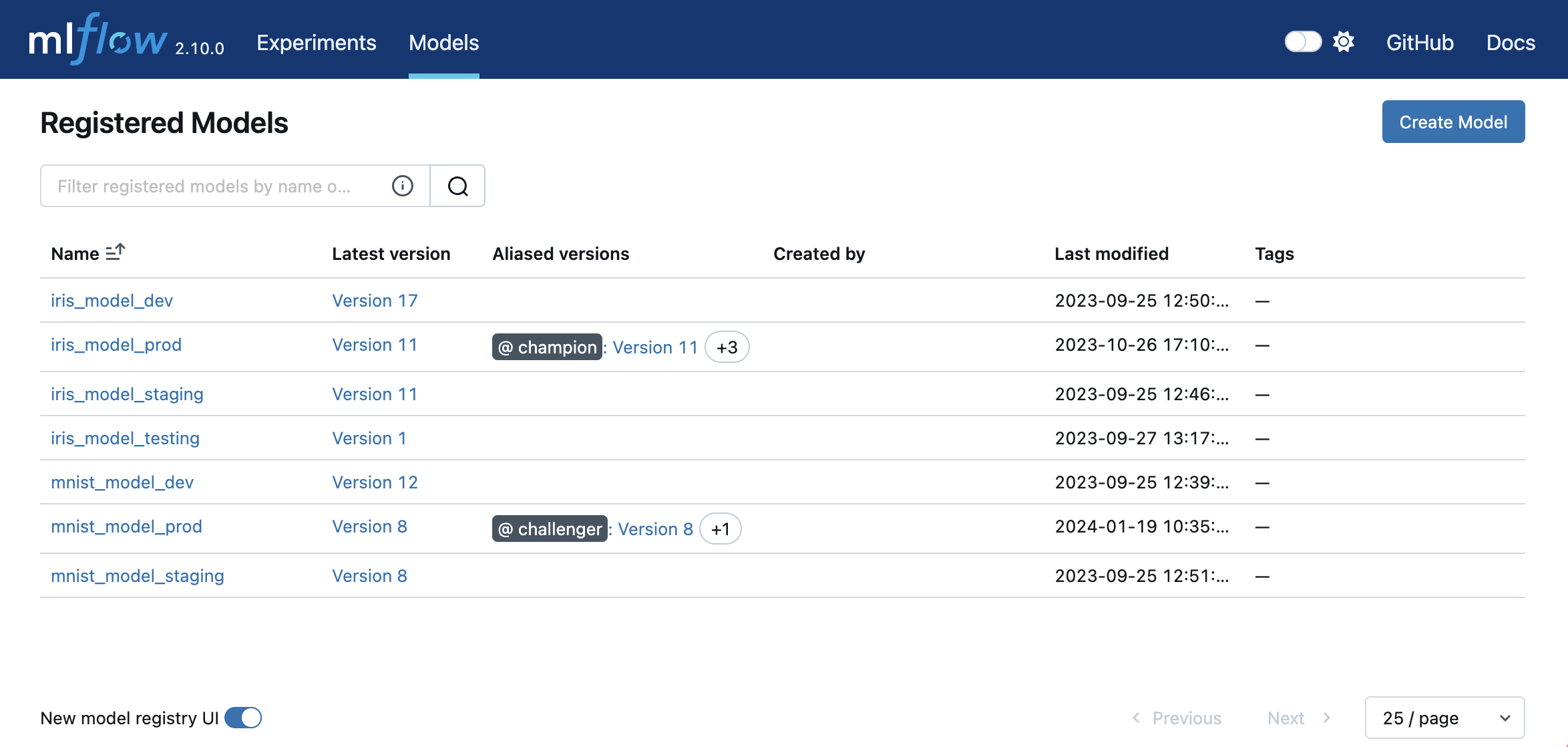
This component offers a centralized system for managing the entire lifecycle of machine learning models (a model store), offering functionalities such as versioning, storing models, aliases, and annotations.
- Model Version:
- Each registered model can have multiple versions.
- New models added to the same registered model become new versions (i.e., the version number increases).
- Can have tags for tracking attributes (e.g., pre-deployment checks).
- Model Alias:
- A flexible reference to a specific model version, such as “champion” or “challenger”.
- Lets you use a name (alias) instead of the full model URI.
- Aliases replace the older Staging and Production stages, which MLflow has deprecated.
- Tags:
- To label and categorize, attach key-value pairs to models and versions.
- Example: “task” tag for identifying question-answering models.
- Annotations and Descriptions:
- Markdown text for documenting models and versions.
- Include details like algorithm descriptions, datasets used, or methodology.
- Provides a central location for team collaboration and knowledge sharing.
What’s New in MLflow 3
MLflow 3, released in June 2025, expanded the platform from classic machine learning to generative AI. New releases ship frequently, and the 3.x line now positions MLflow as an AI engineering platform for models, LLMs, and agents. Key additions include:
- Tracing: Captures every step of an LLM or agent call, including inputs, outputs, latency, and token usage, built on OpenTelemetry.
- GenAI evaluation: Built-in metrics and LLM judges score the quality of responses during development and in production.
- Prompt Registry: Versions and manages prompts the same way the Model Registry manages models, with automatic prompt optimization.
- AI Gateway: A single interface for routing requests to different model providers, with rate limits, fallbacks, and cost control.
- Stronger lineage: Links between models, runs, traces, prompts, and evaluation results.
For teams building agentic systems, these features matter as much as experiment tracking does for classic models. An agent that calls a vision model, reasons about the result, and triggers an action needs every step traced and evaluated before it can be trusted in production.
MLflow on Databricks
Open source MLflow can run anywhere, but many enterprises use the managed version. Databricks delivers a fully hosted MLflow that connects to the rest of its data platform:
- Unity Catalog integration: On Databricks, the MLflow Model Registry integrated with Unity Catalog adds centralized governance, access control, and lineage for models across workspaces.
- Databricks Model Serving: Registered models can be deployed as real-time endpoints directly from the registry.
- Agent evaluation and monitoring: Databricks builds its agent quality tools on MLflow evaluation and tracing.
You can read more in the Databricks MLflow documentation.
Setting Up MLflow
When setting up MLflow, you can run it locally on your machine, on a server, or in the cloud. To read more on how to set it up, check the official documentation.
- Local Setup: Run MLflow locally for individual use and testing. Simply install MLflow using pip, and you can start logging experiments immediately using the file store on your local filesystem.
- Server Setup: You may want to set up an MLflow tracking server for team environments to allow access by multiple users. This involves running an MLflow server with specified database and file storage locations. You can use a database like MySQL or PostgreSQL for storing experiment metadata and a remote file store like Amazon S3 for artifacts.
- Cloud Providers: MLflow can also integrate with cloud platforms, allowing you to leverage cloud storage and compute resources. Providers like Databricks, as well as Amazon SageMaker and Azure Machine Learning, offer managed MLflow services, simplifying the setup process.

Interacting with MLflow
MLflow provides various ways to interact with its features:
- MLflow APIs: MLflow offers Python, R, and Java APIs that enable you to log metrics, parameters, and artifacts, manage projects, and deploy models programmatically. These APIs are the primary way in which most users interact with MLflow.
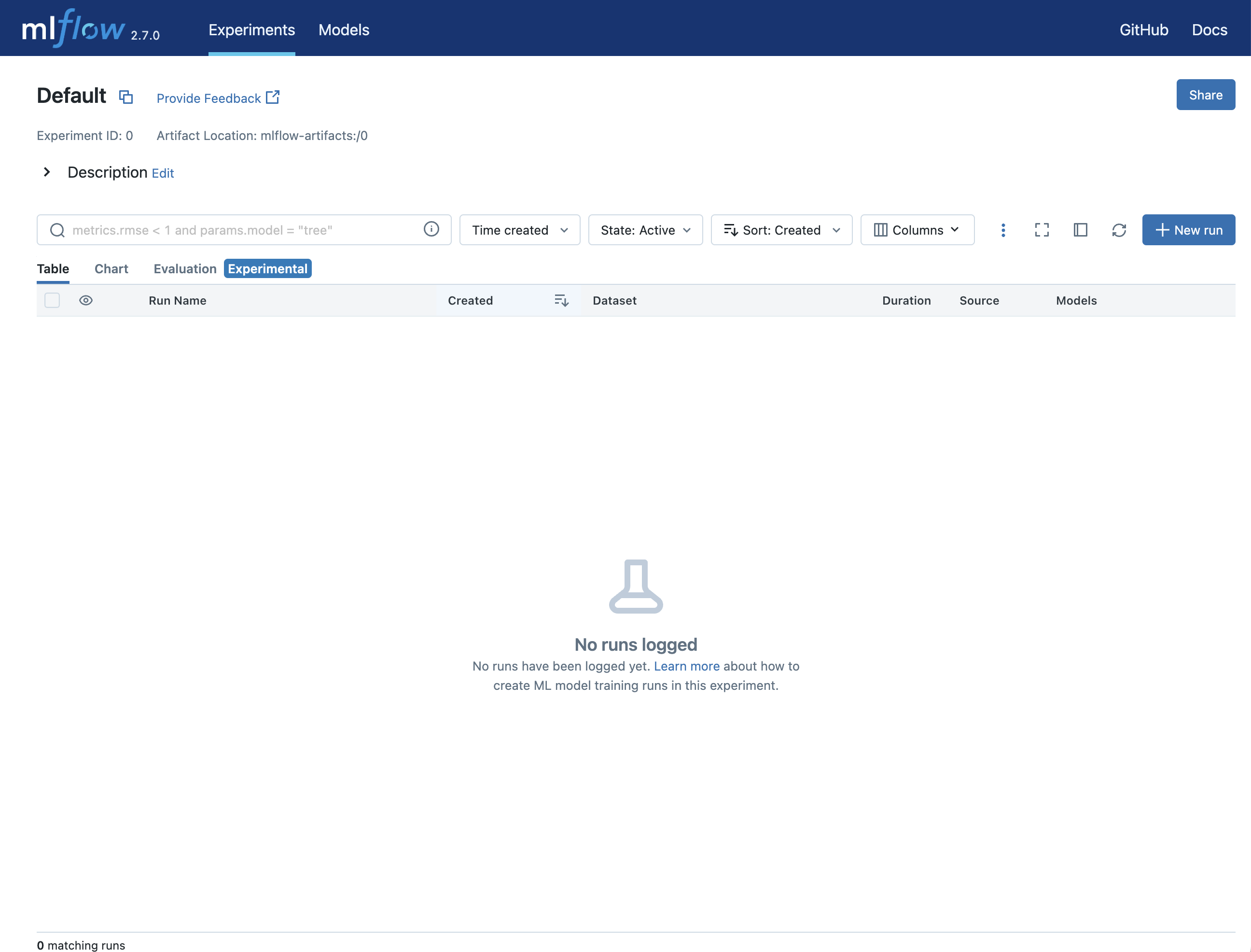
- MLflow UI: MLflow includes a web-based UI that allows you to visualize experiments, compare different runs, and manage models in the Model Registry. It’s a convenient way to review and share results with team members.

MLflow UI (Source) - CLI: The MLflow Command-Line Interface (CLI) is a powerful tool. It allows users to interact with MLflow’s functionalities directly from the terminal, offering an efficient way to automate tasks and integrate MLflow into broader workflows or CI/CD pipelines.
Example Use Cases of MLflow
Here are a few hypothetical scenarios where MLflow can enhance ML model package development.

- IoT Anomaly Detection: A manufacturing company uses the Model Registry to manage anomaly detection models deployed on their production equipment. Different versions of the model can be tested and promoted with aliases before deployment to ensure they accurately identify potential equipment failures and prevent costly downtime.
- Visual Quality Inspection: A manufacturer trains several object detection models to spot defects on a production line. MLflow logs each training run, compares accuracy and inference speed across model sizes, and keeps the approved model versioned in the registry before it is deployed to edge devices on the factory floor.
- Agentic Computer Vision: A team building an agentic computer vision system uses MLflow Tracing to record how an agent interprets camera events, which tools it calls, and which alerts it sends, then evaluates those traces to catch mistakes before rollout.
- Autonomous Vehicle Development: A company developing self-driving cars leverages MLflow Projects to ensure the reproducibility of their perception and control algorithms. Each project version is stored with its dependencies, allowing them to replicate training runs and easily roll back to previous versions if needed.
- Personalized Learning Platform: A company tailors educational content for individual students. MLflow Tracking helps track experiments by comparing different recommendation algorithms and content selection strategies. By analyzing metrics like student engagement and learning outcomes, data scientists can identify the most effective approach for personalized learning.
- Fraud Detection: A bank uses MLflow to track experiments with various machine learning models for fraud detection. They can compare different models’ performance under various conditions (e.g., transaction size, location) and fine-tune hyperparameters for optimal fraud detection accuracy.
- Social Media Content Moderation: A social media platform uses the MLflow Model Registry to manage the deployment lifecycle of content moderation models. They can version models for different levels of moderation (e.g., automated vs. human review) and integrate the Model Registry with CI/CD pipelines for automated deployment of new models.
- Drug Discovery and Research: A pharmaceutical company utilizes MLflow Projects to manage workflows for analyzing large datasets of molecules and predicting their potential effectiveness as drugs. Versioning ensures researchers can track changes to the project and collaborate effectively.