
Most teams that open Viso Now for the first time type something short, such as “detect people,” and get exactly that: bounding boxes around every person in the frame, which is classic object detection. The output is accurate, yet it rarely changes a decision on its own. The prompts that pay off describe a business question, the condition that matters, and what should happen when that condition is met.
This guide collects ten Viso Now prompts built around real operating problems in manufacturing, logistics, food production, retail, construction, energy, quick-service restaurants, commercial real estate, and transportation. Each one includes prompt text you can adapt, the business case behind it, and the insights it returns.
None of them require training data, labeling, or model training, because Viso Now builds the vision agent directly from your description. Until recently, building computer vision systems meant collecting images, labeling them, and training AI models for each new use case, so getting a working vision application onto a site was a project in itself.
What Makes a Viso Now Prompt High Value
Agentic computer vision, or agentic vision, allows you to describe the task in plain language; the platform assembles the input connection, detection logic, and alert wiring, and you refine rules, thresholds, and outputs before publishing the application. In agentic vision, the prompt acts as the specification for the whole vision agent, so its quality sets the ceiling on what you get back.
Text prompts work here because modern vision language models pair a language model with visual understanding and are trained to follow open-ended visual instructions, an approach popularized by research on visual instruction tuning. High-value prompts give that model five things to work with:
- The scene: where the camera is and which area of the frame matters
- The subject: the people, vehicles, objects, or equipment you care about
- The condition: the distance, duration, count, or sequence that turns an observation into an event
- The record: what to log for every event, such as a timestamp, snapshot, location, or reason
- The action: who is notified and through which channel, whether Slack, Microsoft Teams, email, or an API
A quick test for any prompt: if a supervisor read it aloud to a new hire, would that person know exactly what counts as an event and what to do about it? If the answer is no, the vision agent will not know either.
Each of the following prompts works on uploaded video or still images, and the same description can run continuously on a live camera feed once you connect one. Swap in your own zone names, thresholds, and channels to match your site. Together, they cover the vision tasks that come up most often in real-world computer vision, from counting and timing to reading instruments and checking compliance.
Bring a new AI vision application to life.
1. Forklift and Pedestrian Near Misses in Manufacturing
Prompt: “Monitor the shared aisle between racking rows A and B. Flag every moment a forklift comes within two meters of a person on foot, including people outside the painted walkway. For each event, log the timestamp, a snapshot, the direction of travel, and whether the person was inside the walkway. Send a daily summary to the EHS team in Microsoft Teams.”
Forklift operation in the United States falls under OSHA’s powered industrial truck standards, yet close calls often go unrecorded because nothing was damaged and nobody was hurt. This prompt turns those invisible events into data your safety team can act on, and it complements dedicated near-miss detection and forklift safety technology.

- Near-miss frequency by aisle, shift, and hour, a leading indicator that moves long before injury rates do
- Whether pedestrians leave the walkway because of layout, such as a route that ends short of a break room
- Evidence to justify physical fixes like barriers, convex mirrors, or one-way traffic
2. 5S Workstation Audits on the Production Line
Prompt: “Review these end-of-shift images of assembly stations 1 to 12. For each station, check whether every tool is back on its shadow board, the floor is clear of parts and packaging, and no bins are stacked above the red line. Score each station pass or fail on each item and list what is out of place.”
A 5S audit usually depends on a supervisor walking the line with a clipboard, so the result varies with who audits and when they do it. Running the same checklist through a vision agent applies one standard to every station on every shift, which makes week-over-week trends meaningful.

Stations that fail on the same item repeatedly point to a design problem, such as a shadow board that sits too far from where the tool is used, and that is the kind of finding computer vision for quality assurance is built to surface.
3. Loading Dock Dwell Time in Logistics
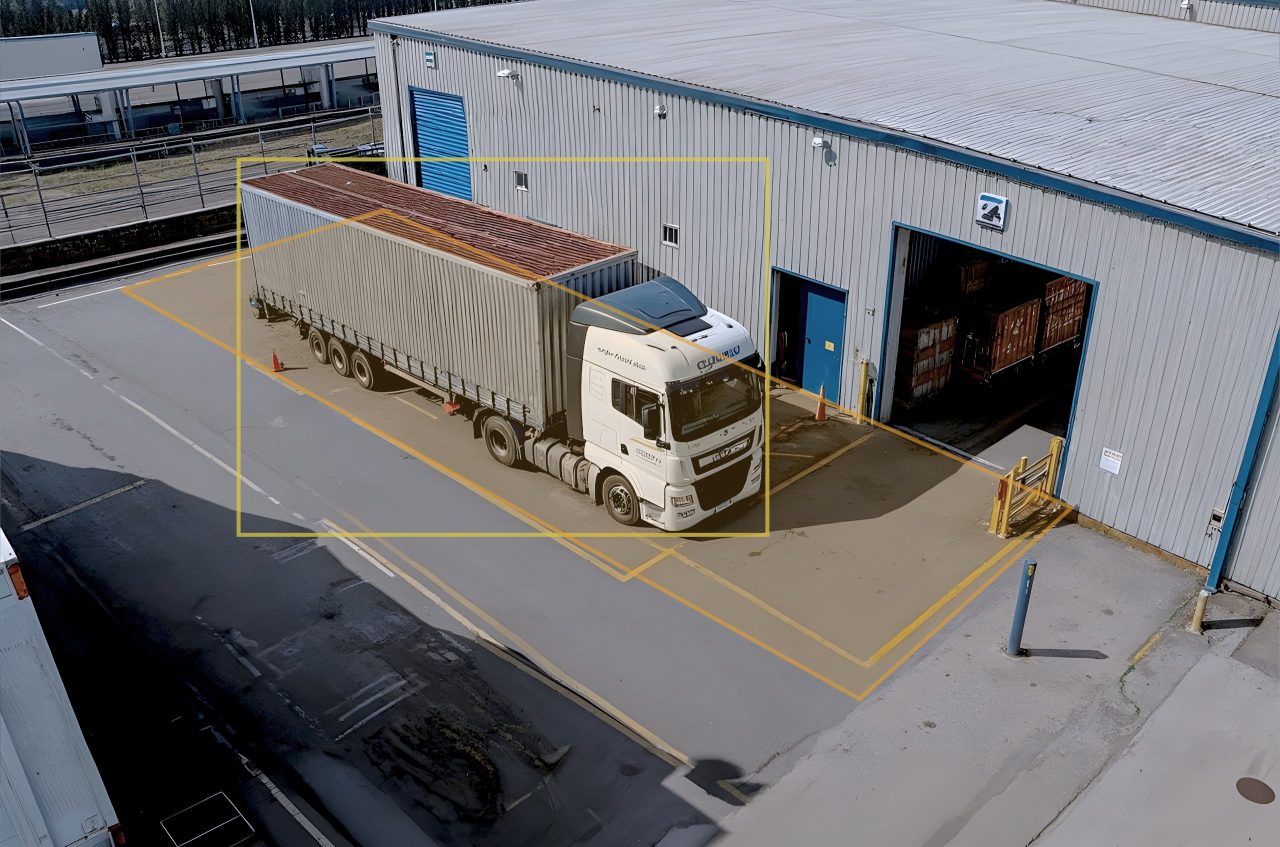
Prompt: “Watch dock doors 1 to 6. Record when each trailer backs in and pulls away, and log any period longer than 15 minutes when a trailer is docked but nobody is loading or unloading it. Flag any dock door left open with no trailer present. Post an alert to the #yard-ops Slack channel when idle time passes 30 minutes.”
Dock schedules usually record arrival and departure, but they rarely show how much of that docked time was spent waiting. This prompt separates active handling from idle time, which helps logistics managers challenge detention charges, rebalance labor, and plan appointment slots around real turn times. It builds on the same logic as vehicle dwell time monitoring used across computer vision in logistics.
- True turn time per door and per carrier
- Idle minutes hidden inside docked time
- Open-door events that create security and energy exposure
4. Hand Hygiene at the Entry to Food Production
Prompt: “At the entrance to the high-care production area, check that every person washes their hands at the sink for at least 20 seconds and puts on a hairnet before crossing the yellow line. Log each entry as compliant or noncompliant with the reason, and email the shift QA lead a list of noncompliant entries with snapshots at the end of each shift.”
The FDA maintains a dedicated health and personal hygiene handbook for food employees, and auditors expect plants to show that hygiene controls hold at the point of entry. A vision agent checks every entry, including the night shift and weekend crews that a QA lead cannot observe in person. Combined with PPE detection, this prompt is a practical starting point for computer vision in food manufacturing.
- Compliance rate by entrance, shift, and day of the week
- Which step is skipped most often, so retraining targets the right behavior
- Time-stamped evidence ready for customer and regulatory audits
5. Checkout Queue Length and Abandonment in Retail
Prompt: “Count the people waiting in each checkout lane every minute. Flag when any lane has more than five people waiting for longer than three minutes while another register is closed. Also log anyone who leaves a queue with items in hand before reaching the register.”
For most stores, retail queue management comes down to staffing. By pairing queue length with register status, this prompt shows store managers exactly when the roster falls behind demand and how quickly the team responds once a lane backs up. Abandonment events give a conservative proxy for lost sales, and the same approach extends to other computer vision applications in retail.

6. Exclusion Zones Around Heavy Equipment in Construction
Prompt: “Treat the swing radius of the excavator as a restricted zone. Flag any person who enters the zone while the excavator is operating, and note whether they are wearing a hard hat and high-visibility vest. Send an immediate email alert with a snapshot to the site manager.”
Exclusion zones are written into almost every site safety plan, but enforcement relies on a spotter who cannot watch every angle. This prompt adds a second set of eyes, records how often the zone is breached and by whom (by trade or task, without identifying individuals), and shows whether breaches cluster around specific activities such as material deliveries. It follows the same pattern as hazardous zone identification used in computer vision in construction.

7. Analog Gauge Readings in Energy and Utilities
Prompt: “In each uploaded photo from the morning inspection round, read the pressure gauge and record the value in psi alongside the asset tag visible in the frame. Flag any reading below 40 or above 60 psi, and export all readings as a table with timestamps.”
Many brownfield plants still rely on analog gauges that technicians read and write down by hand. Retrofitting every one with a digital sensor is expensive, while a photo taken on an existing inspection round costs nothing extra. This prompt converts those photos into a structured, searchable record, flags out-of-range values the same morning, and builds a trend line for each asset over time. See analog instrument reading for how the approach applies across energy and utilities.
8. Order Handoff Times in Quick-Service Restaurants
Prompt: “Watch the pass between the kitchen and the front counter. For every bagged order placed on the pass, record how long it stays there before a staff member hands it to a customer or driver. Flag any order that waits longer than four minutes, and report the average wait for each 30-minute period.”
Kitchen display systems measure how fast food is made, but they stop measuring once the order is marked ready. The minutes an order spends on the pass affect food quality, delivery driver wait times, and customer ratings. This prompt shows which dayparts create a handoff bottleneck and whether the fix is staffing, layout, or process, as seen in this fast food process adherence case study.
9. Meeting Room Occupancy in Commercial Real Estate
Prompt: “For each meeting room, count the number of people present every 15 minutes during business hours. Log rooms that are booked but empty for more than 15 minutes, and rooms with eight or more seats used by one or two people. Produce a weekly utilization summary by floor.”
Booking systems report reservations, which often differ from how rooms are actually used. This prompt measures actual space utilization, exposes ghost bookings, and shows whether a portfolio needs more small rooms and fewer large ones before a lease renewal. It counts people without identifying them, which keeps the use case aligned with workplace privacy expectations, and it follows the same approach as occupancy detection.

10. Gate Throughput and Vehicle Mix in Transportation Hubs
Prompt: “At the main site gate, count every vehicle entering and leaving, classified as truck, van, or car. Record how many vehicles are waiting at the gate each minute, and flag any truck that stops in the fire lane beside the gatehouse for more than two minutes.”
Ports, distribution centers, and depots plan gate staffing and slot bookings around assumed arrival patterns. This prompt replaces those assumptions with measured arrivals by vehicle type and hour, shows when queues spill onto public roads, and documents fire lane violations for follow-up with carriers. It extends standard vehicle counting with the conditions that operations teams actually manage.
Viso Now Prompts at a Glance
| # | Industry | What the Prompt Watches | Decision It Supports |
|---|---|---|---|
| 1 | Manufacturing | Forklift and pedestrian proximity | Traffic layout and barrier placement |
| 2 | Manufacturing | 5S condition of each workstation | Audit consistency and station redesign |
| 3 | Logistics | Docked and idle trailer time | Labor allocation and appointment slots |
| 4 | Food production | Handwashing and hairnet compliance | Targeted retraining and audit evidence |
| 5 | Retail | Queue length and abandonment | Register staffing by hour |
| 6 | Construction | Entries into equipment exclusion zones | Site controls and delivery planning |
| 7 | Energy and utilities | Analog gauge values | Same-day response to out-of-range assets |
| 8 | Quick-service restaurants | Order wait time on the pass | Handoff staffing and kitchen layout |
| 9 | Commercial real estate | Room headcount versus bookings | Portfolio sizing and lease decisions |
| 10 | Transportation | Gate traffic by vehicle type | Gate staffing and slot booking |
How To Write Your Own Computer Vision Prompts
The ten examples above follow a handful of habits that carry over to any site. General prompt engineering techniques from generative AI still apply, but prompts for AI vision add the physical world to the problem: distances, durations, zones, and lighting all affect the result.
- Start from a decision: ask what someone will do differently with the output, then describe the event that should trigger it
- Use measurable thresholds: “within two meters” and “longer than three minutes” are testable, while “too close” and “too long” are not
- Name zones the way your team does: dock numbers, aisle letters, and line names make alerts readable without a map
- Ask for evidence: a snapshot and timestamp with every event lets reviewers confirm the output quickly
- Test on a short clip first: refine thresholds on a few minutes of footage before running long video, since the Viso Now free plan includes daily credits for building and testing
- Count rather than identify: design prompts around behavior and conditions, in line with GDPR-compliant vision practice and the EU AI Act
Vision language models can still misread a scene, and research such as HallusionBench documents how large models produce confident answers that the image does not support. Keep a human in the loop for any alert that triggers a disciplinary, financial, or safety-critical action.
From a Single Prompt to Agentic Computer Vision at Scale
Every prompt in this list can start as AI video analysis on a single uploaded clip and become a running application once you connect a camera through RTSP or ONVIF, cloud storage, or a file upload. Outputs route to Slack, Microsoft Teams, email, or an API, and alerts and dashboards show trends, counts, and deviations over time.
That shift from a one-off answer to a vision AI agent that keeps working is what separates agentic computer vision from traditional video analytics, which typically needs a trained model and hand-coded rules for every new condition.
When a use case proves its value and needs to run across many sites, the next step is Viso Suite, the enterprise platform that manages the full computer vision lifecycle across sites, cameras, and devices, including edge computing for computer vision. For a broader view of where these computer vision use cases sit, explore our overview of video analytics, the wider library of computer vision applications, and how natural language changes footage review in when cameras become queryable.
Try any of these prompts on your own real-world problems in Viso Now today, or book a demo to discuss an enterprise rollout.